
Set up
- Create an API key with Anthropic (Claude) or OpenAI.
- In Content Polisher → Settings → AI proofreading, choose the Provider and paste the API key.
- Optionally choose a Model (leave empty for the recommended one) and a Daily request limit (100 by default).
Keeping the key out of the database
For better security, define the key in wp-config.php instead of saving it in the settings:
define( 'CONTENT_POLISHER_CLAUDE_API_KEY', 'sk-ant-…' );
// or
define( 'CONTENT_POLISHER_OPENAI_API_KEY', 'sk-…' );
The settings page then shows "Defined in wp-config.php".
Proofread a post
- Run a scan, then click Proofread with AI next to a post in the results.
- Confirm. The text is sent to your provider and the suggestions appear among the post's issues, labelled AI proofreading.
- Review each suggestion and click Fix or Ignore. Nothing is applied automatically.
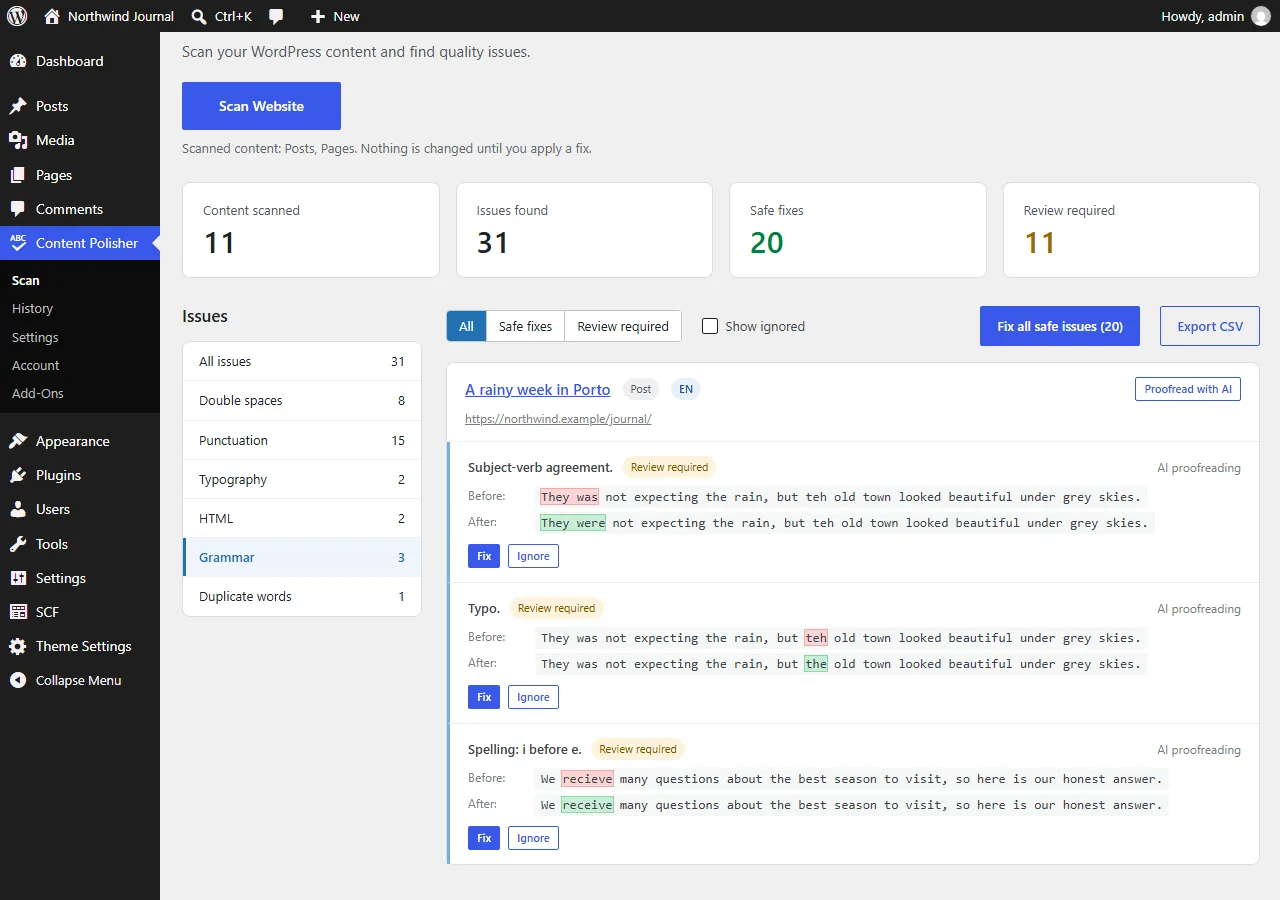
Site-wide content from ACF options pages can be proofread from the Site-wide content group.
What is sent
- Only the post you choose to proofread, after you confirm — never during regular scans.
- The visible text of the post and of its enabled ACF fields, in one request. HTML markup, links and e-mail addresses are not sent.
- Requests go directly from your server to the provider you selected, with your key. Content Polisher's author never receives your content or your key.
The provider's own terms and privacy policy apply to the text you send: Anthropic, OpenAI. The plugin adds a suggested paragraph to Settings → Privacy in WordPress for your site's privacy policy.
Costs and limits
- You pay the provider directly at their rates — usually a few cents per post or less, depending on the model and the length.
- Re-checking an unchanged post is free: answers are cached.
- The daily request limit stops AI requests for the rest of the day once reached. The settings page shows how many were used today.
Troubleshooting
- "The API key was rejected" — check the key and that the account has credit.
- No "Proofread with AI" button — choose a provider and add a key, and make sure your Pro license is active.
- Daily limit reached — raise the limit in settings or wait until tomorrow.