
How to spell check ACF fields in WordPress
On many WordPress sites, the post content is only part of the text. Subtitles, FAQ answers, team bios, testimonials, call-to-action texts and the footer all live in Advanced Custom Fields. Typos there are just as visible — but almost every proofreading tool, content audit and search-replace workflow only looks at the post content, so ACF text goes unchecked for years.
This guide shows where ACF keeps your text, how to pull it out for a manual check, and how to scan and fix it in place.
Contents
Why ACF text is easy to miss
- Browser spell check only underlines words in the field you are editing, one field at a time — and only when you open that post.
- Repeaters and Flexible Content hide most rows until you expand them. Nobody reopens row 14 of an FAQ to reread it.
- Options pages (footer text, banners, notices) are edited once and then forgotten, yet they appear on every page.
- ACF blocks store their fields inside the block, not as post meta, so tools that read custom fields do not see them either.
Where ACF stores text
| Where you edit it | Where it is stored | Example |
|---|---|---|
| Field on a post or page | wp_postmeta, meta key = field name | subtitle |
| Repeater / Flexible Content row | wp_postmeta, name with row index | faq_2_answer |
| Group sub-field | wp_postmeta, group and field name | hero_title |
| Options page | wp_options, prefixed with options_ | options_footer_text |
| ACF block | Inside the post content, as JSON in the block comment | <!-- wp:acf/testimonial {"data":{"quote":"…"}} /--> |
For every value, ACF also stores a reference row whose name starts with an underscore (_subtitle) and holds the field key. Only Text, Text Area and WYSIWYG fields contain prose; numbers, URLs, e-mails, selects and relationships do not need proofreading.
Export all ACF text for a manual check
With WP-CLI, this script prints every text value from ACF fields of published content and options pages, one per line, ready to paste into a spell checker. Save it as acf-text.php and run wp eval-file acf-text.php > acf-text.txt.
<?php
// Prints the text of ACF fields: "Post title › field › row › sub field: text".
function cp_print_text( $value, string $path ): void {
	if ( is_array( $value ) ) {
		foreach ( $value as $key => $item ) {
			cp_print_text( $item, $path . ' › ' . $key );
		}
		return;
	}
	if ( ! is_string( $value ) || filter_var( $value, FILTER_VALIDATE_URL ) ) {
		return;
	}
	$text = trim( wp_strip_all_tags( $value ) );
	if ( preg_match( '/\p{L}{3}/u', $text ) ) { // Skip values without real words.
		echo $path . ': ' . $text . PHP_EOL;
	}
}

$ids = get_posts( array(
	'post_type'   => 'any',
	'post_status' => 'publish',
	'numberposts' => -1,
	'fields'      => 'ids',
) );
foreach ( $ids as $id ) {
	cp_print_text( get_fields( $id ) ?: array(), get_the_title( $id ) );
}
cp_print_text( get_fields( 'option' ) ?: array(), 'Options' );
A few limitations to keep in mind:
get_fields()returns formatted values, so image fields also print their title, alt text and caption — useful, but noisy.- ACF blocks are not included: their data lives in the post content. You would need to parse blocks with
parse_blocks()and read each block'sattrs['data']. - You still have to find each mistake again in the editor to fix it, open the right repeater row, and remember what you changed.
Scan and fix ACF fields with Content Polisher Pro
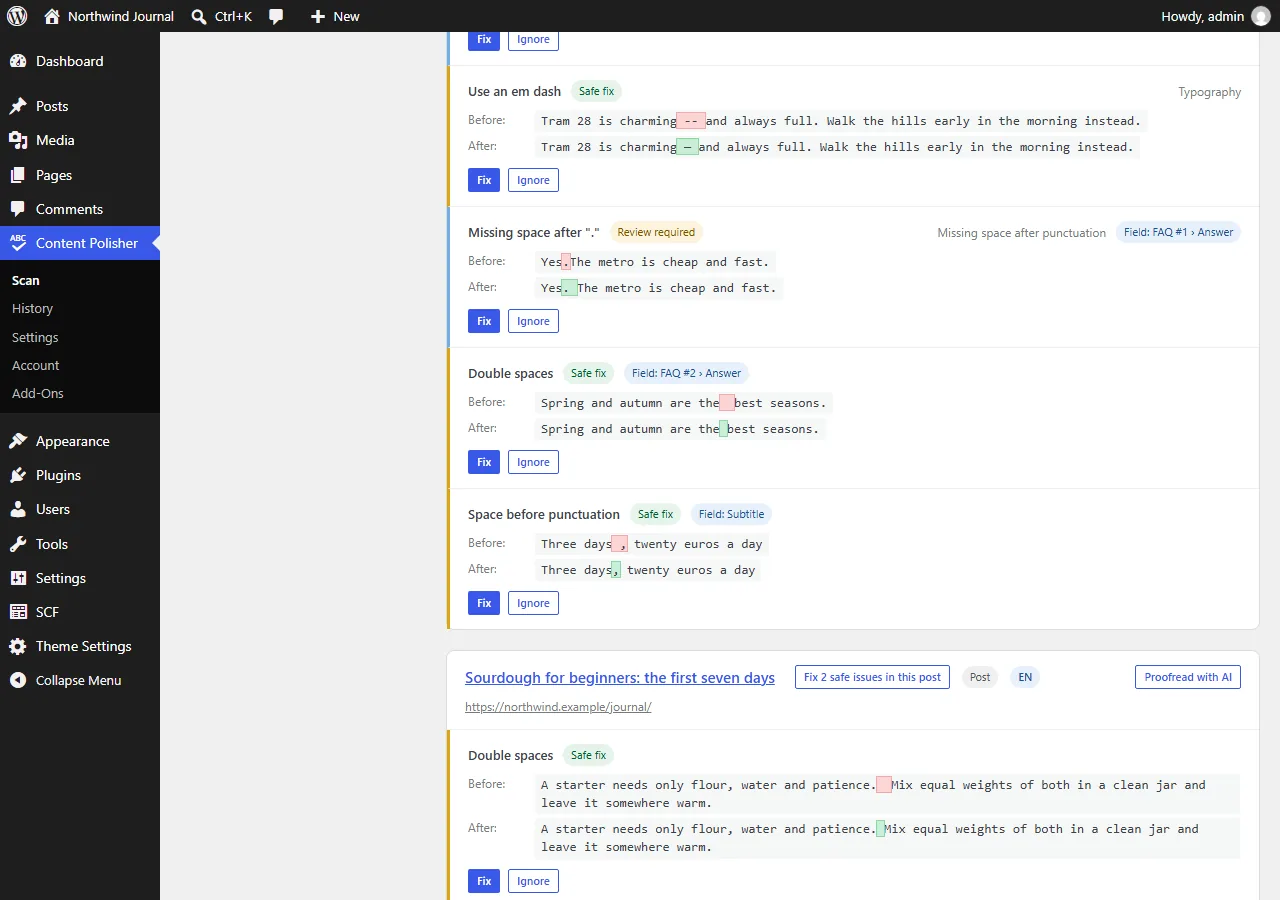
Content Polisher Pro checks ACF text in place, with the same preview, history and undo as the post content:
- Post fields — Text, Text Area and WYSIWYG, including fields inside Repeater, Group and Flexible Content.
- ACF blocks — the same fields inside blocks. Only the changed value is rewritten, so undo restores the post exactly.
- Options pages — site-wide texts such as the footer, listed as "Site-wide content".
- Every issue shows which field it is in — FAQ #2 › Answer — so there is nothing to hunt for.
- Rules catch double spaces, punctuation spacing, dashes and duplicate words; AI proofreading with your own Claude or OpenAI key adds spelling and grammar, sending the post and its fields in one request.
- Each field change is recorded in History and can be undone on its own.
It works with Advanced Custom Fields (free and PRO) and Secure Custom Fields. See how ACF checks work, or try Pro free for 14 days.