
The text everyone forgets: typos in footers, banners and options pages
A typo in a blog post is seen by that post's readers. A typo in the footer is seen by everyone, on every page, for years. Site-wide text — the footer tagline, an announcement bar, the contact block, the cookie notice — is written once during the build and then never reread. This guide shows where that text lives in WordPress and how to include it in your checks.
Where site-wide text lives
| Where you edit it | Where it is stored |
|---|---|
| Site title and tagline | wp_options (blogname, blogdescription) |
| Widgets (classic themes) | wp_options, serialized widget settings |
| Block theme footer and header | Template parts, stored as wp_template_part posts once edited |
| Customizer and theme options | wp_options / theme mods |
| ACF options pages | wp_options, prefixed with options_ |
| Reusable blocks (patterns) | wp_block posts |
None of these is a regular post or page, so most content audits never see them.
A quick manual check
- Open the home page and one inner page, and read only the parts that repeat: header, navigation labels, sidebar, footer, banners.
- Check the same on a phone — announcement bars and footers often show different, shorter text on mobile.
- Open the theme's options and any ACF options pages and read each text field.
- Check transactional texts too: form confirmation messages, the 404 page, the search results "nothing found" text.
Checking ACF options pages automatically
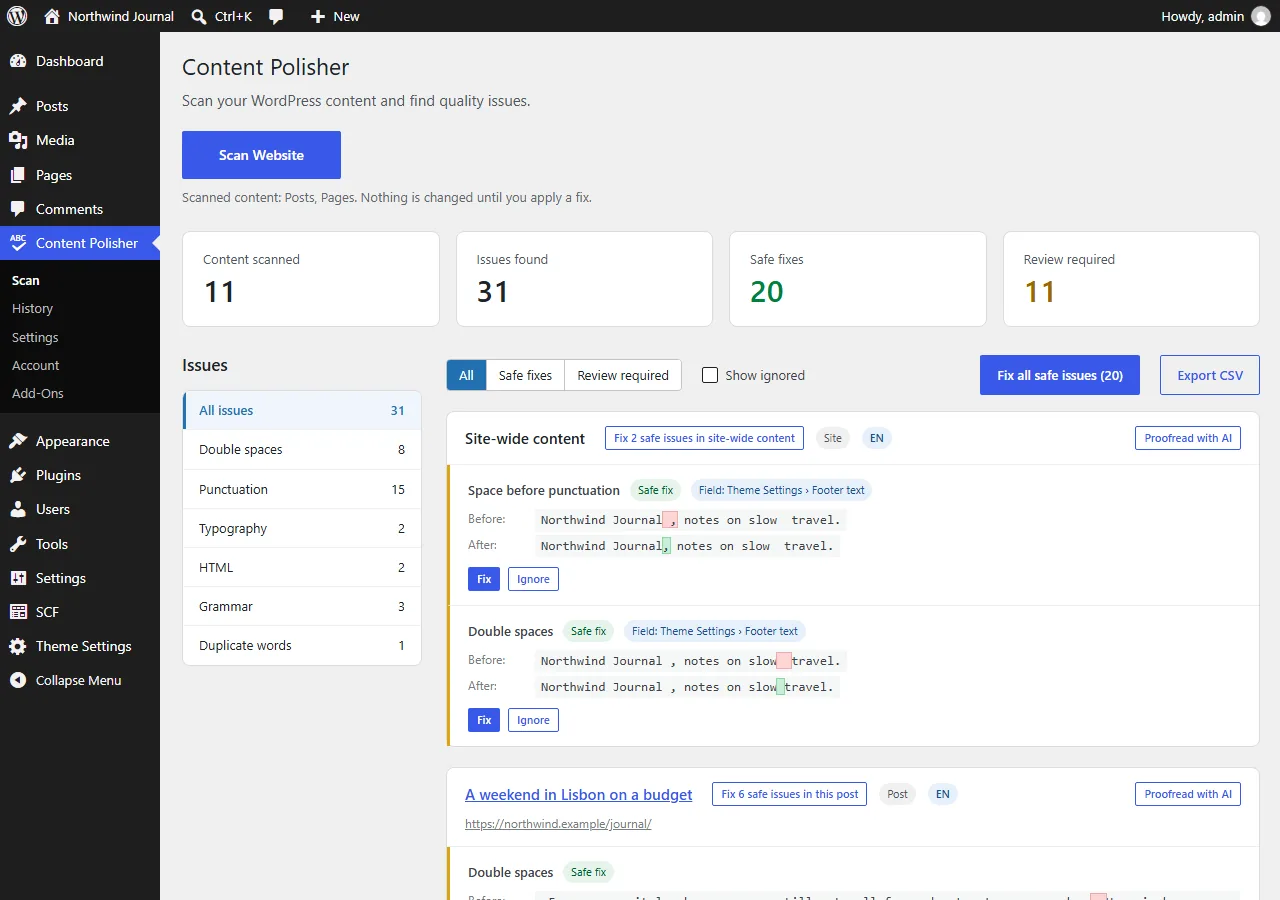
Many custom themes keep exactly this kind of text — footer copy, contact details, banners — in ACF options pages. Content Polisher Pro includes them in the scan:
- Text, Text Area and WYSIWYG fields of options pages are listed as Site-wide content, with the page and field name: Theme Settings › Footer text.
- The same rules apply as for posts — spacing, punctuation, dashes, duplicate words — plus AI proofreading for spelling and grammar.
- Fixing site-wide text requires the
manage_optionscapability, and every change can be undone from History.
Template parts, widgets and theme options are still worth a manual read once in a while — they change rarely, so a quick check after each redesign is usually enough.